
This article was created with the AI assistant Claude and published by Peter Hoenig.
If you have several lines of business – coaching and organisational consulting, for example – you will want to know what each of them costs. Until now, my accounting tool only sorted this by receipt type, in other words according to tax law. Now every receipt, every invoice, every entry of your own and every fixed asset can be assigned to a cost centre, and every receipt type to a cost type. The analysis then shows which costs arise where. Because cost centres and cost types are kept in the master data, all tools see the same ones – maintained once, available everywhere.
How do you analyse costs by cost centre and cost type?
I enter the cost centre when I record a receipt; if the receipt type or the customer has a default, it is already filled in – visibly, and it can be changed. Invoices from project management bring their cost centre with them, and incoming invoices from the Kunden-Navigator, my customer care tool, their cost centre and cost type. The cost type follows the receipt type – only if a receipt is out of the ordinary does it get its own. Depreciation counts as the cost type “Depreciation”. Private receipts have neither a cost centre nor a cost type.
Under “Reports → Costs by cost centre and cost type”, I see the expenses per cost centre, per cost type and in the cross table. With the cash-basis income statement (Einnahmenüberschussrechnung, EÜR), the basis is the payment date – excluding input VAT, but including the portions that are not tax-deductible, because costs remain costs. With double-entry bookkeeping, the expense accounts count. For a whole year, the tool reconciles the figures with Annex EÜR or the profit and loss account as a check.
Important for proper records under the GoBD (the German principles for keeping books and records in electronic form): on a locked receipt or an issued invoice, even the cost centre can no longer be changed silently – the correction is made by cancellation, as always.
What changes in the DATEV export?
If you have assigned cost centres, their number appears in the posting batch in the KOST1 column – for entries on expense and income accounts; KOST2 remains empty. If a cost centre has no number, the tool points this out. If an invoice is split across several cost centres, a separate revenue line is created for each cost centre. What counts is the number the cost centre has in the master data at the time of export: if you renumber a cost centre, later exports show the new number.
Personal accounts (Personenkonten) are also new: by agreement with your tax adviser, the tool posts receivables and payables to a debtor account for each customer and a creditor account for each supplier instead of the collective accounts. The number ranges start at 10000 for debtor accounts and at 70000 for creditor accounts; both can be changed. The tool suggests the numbers in the preview, and they are assigned permanently when the batch is generated. You receive the account, name and address of each personal account as a CSV list for your tax adviser; the tool does not generate a separate DATEV file with the master data of debtors and creditors.
Reminders without hunting for templates
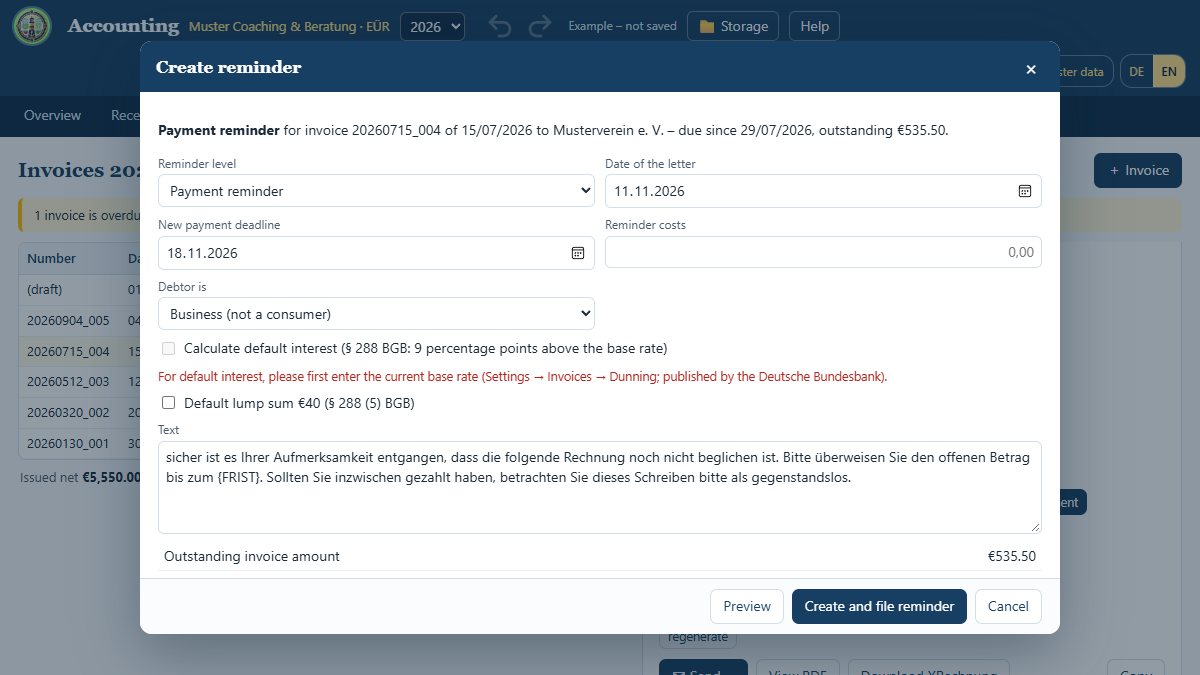
If an invoice is due and still unpaid, the tool offers the next reminder level: payment reminder, 1st reminder and 2nd (final) reminder, marked M1 to M3 in the list of invoices. It suggests a new deadline and, if you wish, calculates the default interest – to the day, at 5 percentage points above the base rate (Basiszinssatz) if a consumer owes the invoice, otherwise at 9. You enter the current base rate yourself – it is published by the Deutsche Bundesbank twice a year. Deliberately, no value is pre-filled; without it, the tool calculates no interest. The €40 lump sum for late payment is only an option for business customers, and only once per invoice; dunning charges are initially set to €0. You set the texts and deadlines under Settings → Invoices → Dunning.
The reminder letter is created as a PDF on the same letterhead as your invoices – always in German – and is filed next to the invoice. The invoice itself remains unchanged; every reminder is recorded in the change log.
The amounts are a suggestion, not legal advice. The tool also only suggests when default began: whether and from when a customer is in default, and what dunning charges you may claim, depends on the individual case – if in doubt, please clarify this with your lawyer or tax adviser.
How do you reclaim foreign input VAT?
If you buy in another EU country and pay VAT there, you cannot deduct it as input VAT in Germany. Under certain conditions, however, it can be reclaimed through the input VAT refund procedure (Vorsteuer-Vergütungsverfahren). For receipts with the tax case “Foreign VAT”, you enter the country for this purpose. The report “Input VAT refund (other EU countries)” compiles the receipts of a year per country, with receipts from countries outside the EU listed separately. It also shows the application deadline and minimum amounts as I have built them in – please check these details with your tax adviser before relying on them. You submit the application yourself in the online portal of the Federal Central Tax Office.
What stays the same – and a note on Annex EÜR 2026
The advance VAT return, the ELSTER file and XRechnung remain as they were. The DATEV posting batch, too, remains exactly as before if you use neither cost centres nor personal accounts. For Annex EÜR, the lines and box numbers of the 2025 form are built in; I have not yet incorporated the official 2026 form. For 2026 and later years, the EÜR report and the report “Transfer to tax programs” therefore show a visible notice: please compare the lines and box numbers with the official form or the fields in ELSTER before you use them.
The new fields can also be used on phones and tablets. Your data stays on your computer or in your suite. Please have your tax adviser import the first DATEV file with cost centres or personal accounts as a test. The tool is free of charge and free software: Open the accounting tool.
Trademark notice: DATEV is a registered trademark of DATEV eG. The name is used for descriptive purposes only; there is no connection with the trademark owner.
Open or download the tool
- Bookkeeping toolOpen Download (1.1 MB)
Thinking further
You can find more on this topic under resources and downloads – or talk to me directly in a free initial consultation.
Comments
Comments are published immediately with your name. Only the name, title, comment text and time are stored – see the privacy policy.
Loading comments …