
This article was created with the AI assistant Claude and published by Peter Hoenig.
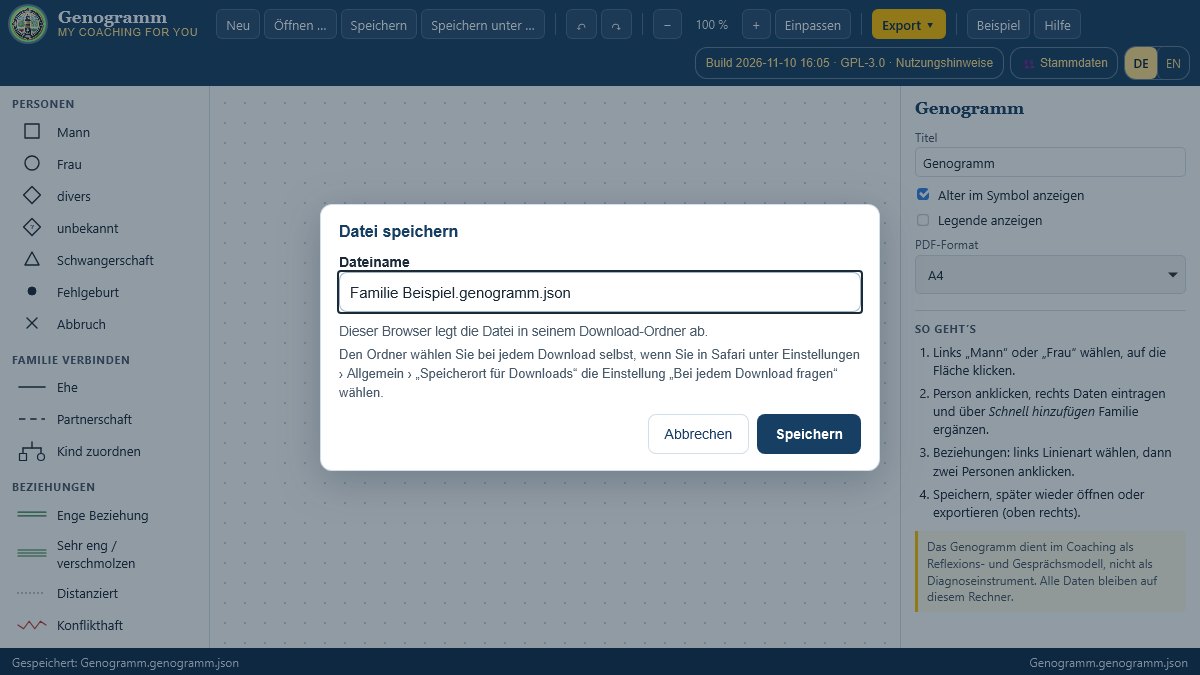
My tools are single HTML files and run in every current browser – on Windows as well as on macOS and Linux. There is one difference when saving: Chrome and Edge offer web pages their own save dialog, Safari and Firefox do not. There, the tools save via the browser's download. Here is what that looks like in everyday use.
Why do Safari and Firefox save differently?
Chrome and Edge allow a web page, with your consent, to write directly to a file or folder on your computer. Safari and Firefox do not offer this interface. For you, this means: your data stays on your device there too, only the route is different – the browser stores the file as a download.
How do you save in Safari and Firefox?
- Click Save or Save as.
- The Save file window opens with a suggested name. Change the name if you like and confirm with Save.
- At the bottom of the tool, the message “Saved in the browser’s downloads folder” appears with the file name.
If you cancel saving, the tool says so explicitly. If you then leave the page without having saved, the browser warns you.
How do you choose the storage location yourself?
Without further settings, Safari and Firefox put every file in the downloads folder. If you would like to choose the folder each time:
- Safari: Settings › General › set “File download location” to “Ask for each download”.
- Firefox: Settings › General › Downloads › turn on “Always ask you where to save files”.
- iPhone and iPad: you will find the files in the “Files” app under “Downloads”.
How do you open a saved file?
With Open you select the saved file in the usual file selection window and continue working. You can switch browsers at any time: a file saved in Safari opens just as well in Chrome, Edge or Firefox.
What only works in Chrome and Edge?
Some tools can also work with a whole folder – for example the 8EM Modeller with its model folder, the accounting tool with its receipt filing or the mind map with a project folder. These folder features are only available in Chrome and Edge; the tool tells you so at the relevant point. In Safari and Firefox you create a new 8EM model as a single file, for example, and save it as described above. The FreeHTML editor opens and saves a whole website project there as a ZIP file.
How do I test this?
Since November 2026, before every new version I additionally test each tool in the browser engines of Safari (WebKit) and Firefox: Save, Save as, reopening the saved file and every button that has to do with files – via the website as well as opened directly.
Conclusion
The tools work just as reliably on Mac and Linux as on Windows. The only difference is the storage location: Safari and Firefox put your files in the downloads folder. If you want to choose the folder each time, switch this on once in the browser settings. I am happy to answer questions via the contact form.
Thinking further
You can find more on this topic under resources and downloads – or talk to me directly in a free initial consultation.
Comments
Comments are published immediately with your name. Only the name, title, comment text and time are stored – see the privacy policy.
Loading comments …