
This article was created with the AI assistant Claude and published by Peter Hoenig.
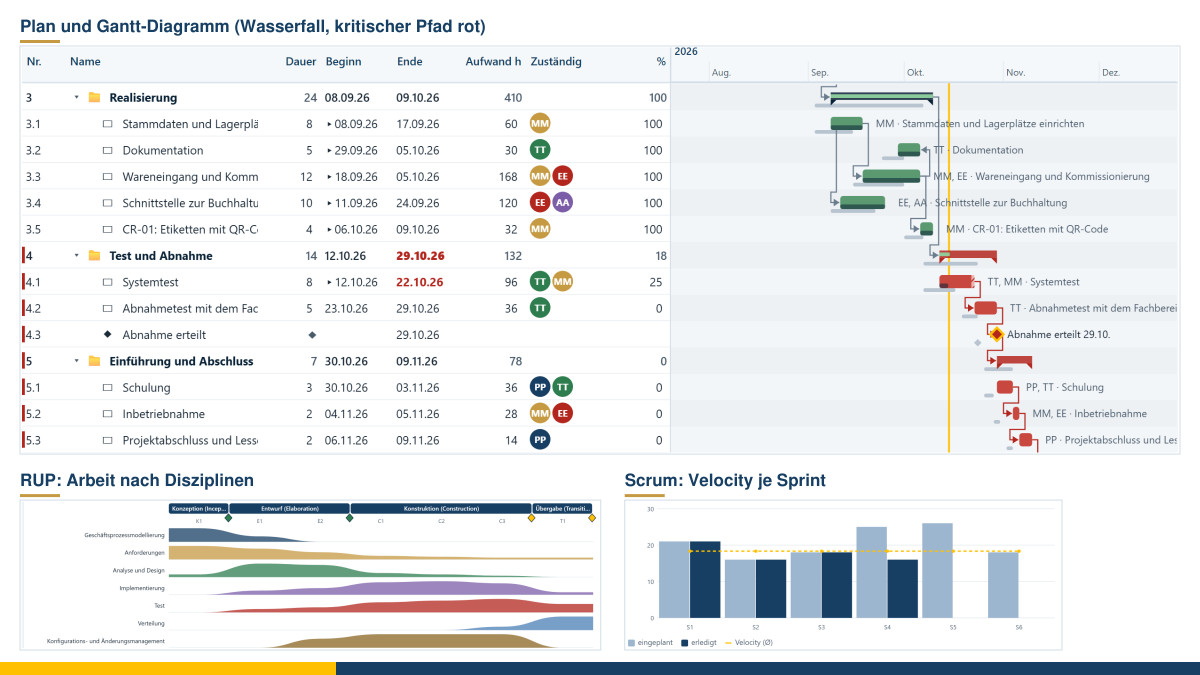
“We’re doing this the agile way” – and then the client asks for a fixed price, a schedule and milestones. Or the other way round: a traditionally planned project stalls during implementation because the requirements keep changing. In the everyday reality of small and medium-sized enterprises, there is rarely one single right process model. It depends on what the project needs. That is why I have built a project management tool that works in a traditional, agile and mixed way – with plan, costs, time recording and billing in one place. It runs in your browser, costs nothing and keeps your data on your computer.
At a glance
- Six process models: Waterfall, V-Model, Rational Unified Process (RUP), Scrum, Kanban and hybrid – each with a suitable template.
- Tabular and graphical: table and Gantt chart side by side, plus a work breakdown structure that can be broken down to any depth, right down to individual tasks, a backlog, a board and a dedicated view for each process model.
- Scheduling: dependencies, critical path, baseline, public holidays for each German federal state and a forecast based on actual progress.
- People and resources: cost and billing rates, weekly hours, share for the project, absences; utilisation per week. Optionally connected to the master data tool.
- Costs and times: time recording in the weekly view, non-personnel and third-party costs, planned, actual and forecast figures with earned value.
- Billing and invoices: on a time-and-materials basis, at a fixed price with a payment plan, per sprint or iteration, per story point or per phase. Invoices for specifically chosen service dates, broken down into working hours, materials, third-party services as well as licences, maintenance and operation – with an annex and handover to the accounting tool.
- Kanban board integrated: import cards from the Kanban tool and export the backlog to it.
- Reports: project status with traffic lights, milestone trend analysis, earned value, velocity, lead times, billing and contribution margin, risks and changes.
- Free and local: free of charge, free software, no registration, nothing is transmitted.
One tool for six approaches
When you create a project, you choose the process model. The tool then inserts a suitable structure, which you can change freely afterwards:
- Waterfall: phases one after the other – initialisation, conception, implementation, test and acceptance, rollout. At the end of each phase there is a quality gate with check criteria. Only its approval opens the next phase.
- V-Model: each design level has a corresponding test level. What is specified in the requirements is checked by the acceptance test; what is laid down in the component design is checked by the component test. A dedicated view shows the “V” with the status of both sides.
- Rational Unified Process: four phases – inception, elaboration, construction, transition – with iterations. Each phase ends with a milestone: objectives agreed, architecture in place, initial operational capability, product release. Work packages and backlog entries carry a discipline such as requirements, analysis and design, implementation or test. From this, the tool draws the well-known distribution of work across the iterations – as planned and as actually booked.
- Scrum: sprints of equal length, a product backlog with user stories and story points, sprint goal, velocity, burndown and release burn-up.
- Kanban: continuous flow without sprints, WIP limits, throughput, lead time and cumulative flow diagram.
- Hybrid: a traditional framework with quality gates, with implementation in sprints.
The model can be changed later; plan, backlog and times are kept.
Plan and Gantt chart: tabular and graphical
The heart of the tool is the plan: the table on the left, the Gantt chart on the right. In the table, you enter names, duration in working days, effort in hours and progress directly. Pressing Enter creates a new task underneath. Alt and the arrow keys indent, outdent and move – so phases, work packages and milestones quickly turn into an outline with work breakdown structure numbers.
In the Gantt chart, you work with the mouse: you drag a bar to a different date and extend it at its right-hand end. If you drag the small dot at the end of a bar onto another bar, you link the two. Besides “Finish → Start”, the tool knows the dependencies “Start → Start”, “Finish → Finish” and “Start → Finish”, each with a lag or an overlap. From this, it calculates dates and float. Tasks without float form the critical path and appear in red. Public holidays follow the federal state; you add company holidays separately.
If a task does not keep to its date, the tool shows this instead of making the plan look better than it is. Anything that, judging by its progress, is taking longer or has not yet started is moved back from today in the forecast, shown with stripes in the Gantt chart. A recorded baseline appears in grey underneath. So you can see at a glance where your project deviates from the original plan.
The outline has no fixed depth: below a phase there are iterations or sprints, below those work packages, below those sub-packages – as fine-grained as your project needs. A sprint or an iteration nevertheless remains a timebox of fixed length; if the work in it extends beyond its end, the tool points this out.
If you prefer to think in structures, use the work breakdown structure as a tree: subprojects side by side, below them iterations, work packages and – if you wish – the user stories right down to the individual tasks. At the selected box, you create subitems, successors or entries with a single click. Drag a box onto another one to place it there. This is how a user story moves to a different iteration or a task moves under a different user story.
Backlog, board and the Kanban tool
For agile projects, there is the backlog with epics, user stories (“As a … I want …, so that …”), tasks and bugs – and, in the traditional approach, requirements as well. Each entry can be assigned to a sprint, an iteration or a work package: you simply drag the row into the appropriate group. For each sprint, the tool shows the planned story points, the team’s capacity and the velocity so far. So you can see when a sprint is overloaded. The effort of the entries feeds into the plan, utilisation, costs and billing. On the board, you change the status by dragging; WIP limits indicate overload.
If you already work with my Kanban board, you do not have to maintain anything twice. The project management tool takes over the cards from a board file or directly from the Kanban tool in the same browser. Status including history, story points, amounts, assignees, user story statements and the definition of done come along too. Conversely, you export the backlog as a board file, continue working in the Kanban tool and import the updated state again – the entries are matched to one another, so no duplicates are created.
Resources, times and costs
Several people can be assigned to a task. Whoever is at the top is the lead and bears the main responsibility; the lead is clearly marked. You change the order by dragging or with a click, so any other person can become the lead. The planned effort is distributed across all assignees.
Each person has weekly hours, a share for the project and absences. In addition, there are two rates: the cost rate states what an hour costs the project; the billing rate states what is charged to the client. Utilisation distributes the planned effort across the weeks and compares it with capacity. Overbooked weeks turn red.
You maintain people and roles in the tool itself or take them over from the master data tool. If this connection is switched on, names, contact details and roles come from the master data; rates and capacity remain in the project.
You record times in a weekly view or via “Book time”; entering a new name creates the person in the team straight away. Non-personnel and third-party costs are added as entries, planned or actually incurred. Anything you procure for the client – materials and goods, purchased third-party services, licences as well as maintenance and operation of software that you set up and customise for them – you mark as “pass on”: with quantity and unit, for example 10 users or 4 items, with a mark-up or a fixed selling price and, for licences, with the service period. This applies to projects of any kind: materials can be building materials just as well as printed documents. These figures produce the earned value analysis: the planned value shows what was planned up to today; the earned value, what has actually been achieved; the actual costs, what it has cost. The cost index and the schedule index each tell you in a single figure whether the project is on track. The cost forecast projects the cost of the remaining work.
Billing – to suit your approach
A fixed-price project is billed differently from a Scrum team with a fixed sprint budget. The tool knows five types:
- Time and materials: booked, billable hours times the billing rate, plus expenses – with a cap that warns you in good time.
- Fixed price with payment plan: instalments tied to milestones, typical of Waterfall and the V-Model. An instalment becomes billable as soon as its milestone has been reached. Approved changes with a price are added as a change order.
- Per sprint or iteration: a flat rate per completed timebox, typical of Scrum.
- Per story point or entry: completed and accepted user stories times the price per story point, or with their own amount, for example from the Kanban board.
- Per phase: each phase or iteration on a time-and-materials basis or at a flat rate. In RUP, for example, inception and elaboration are billed on a time-and-materials basis, the construction iterations at a fixed price.
Each type also includes the costs passed on to the client. Everything billable is broken down by types of service: working hours, flat-rate services such as instalments or sprints, materials and goods, third-party services, licences/maintenance/operation, travel costs.
Invoices for specific service dates
“Create invoice” – in the billing view or directly from the reports – puts the invoice together. You choose a period or just a cut-off date, for example the end of the month, the end of a sprint or a milestone that has been reached. If you wish, you bill only one phase or one work package. Each service can be selected or deselected individually.
On the invoice, you group the working hours by person, role, work package or hourly rate. Materials, third-party services and licences appear individually or as one item each. Subtotals show at a glance what was working time and what was materials, third-party services or software.
The annex documents the details: every hour with date, person, work package and activity, every expense with quantity, unit price and service period, and the supplier if you wish. For licences, it states the hours spent on setting up and customising the software. If you prefer it shorter, choose only the summary by type of service.
One click hands the invoice over to the accounting tool. There it receives its sequential number and all the mandatory details required under German law, is filed as a PDF with annex and as an e-invoice, and is sent by e-mail. The number, dispatch and receipt of payment come back to the project automatically. Cancelling the invoice releases the services it contained again. The statement of work performed can also be printed or saved as a PDF without the accounting tool.
Risks, changes and reports
A risk register with a matrix of probability and impact records measures, responsible persons and review dates. Change requests are assessed for effort, costs and impact on the schedule. Once approved, they can be scheduled as a work package.
The reports bring everything together: project status with traffic lights for schedule, costs, quality and risks; dates with a milestone trend analysis, which shows whether dates are slipping; costs with the earned value curve; resources and times; sprints, velocity and flow; phases, gates and disciplines; billing with invoices per type of service and contribution margin, from where you can also go straight to “Create invoice”; risks and changes. Every report can be printed, saved as a PDF or exported as CSV. “Record status report” saves the traffic lights and key figures with the date, so that the trend over the weeks remains visible. You analyse several projects together with the project analysis tool.
Projects in the enterprise model
A project usually changes more than just itself: goals, capabilities, processes, organisation or IT systems. My 8EM Modeller maps these relationships in the 8-Level Model; it is still under development. The project management tool works together with it. After every change, it provides a calculated project status – with traffic lights, progress, dates, milestones including forecast and trend, costs per cost type, risks and team. From this, the Modeller takes over the milestone planning into the project charter and, if you wish, dates, costs and the people involved; later, one click brings them up to date. Conversely, a project charter described in the model arrives in the project management tool with goals, time frame, budget, milestones and the people involved. You choose the process model, and this produces a project with a suitable template, the milestones and the people involved. Both work directly in the same browser or via a file.
Data and notes
The tool runs entirely in your browser; Chrome or Edge are recommended. Your work is saved in a project file on your computer; in addition, the browser keeps the latest state. Nothing is transmitted. Every change can be undone with the large arrows at the top, and a history shows the last steps. To try it out, there are six entirely fictitious example projects, one for each process model. They are set relative to today’s date, with booked times, invoices and status reports. Time recording and utilisation reports can be used to monitor performance and behaviour. In companies with a works council, their introduction is therefore subject to co-determination. The tool is free of charge and available as free software under the GPL: Open the project management tool.
Conclusion
A tool alone does not make a good project. But it can help you take an honest look: where do we really stand, what does it cost, what is billable, who is overloaded? Whether Waterfall, RUP or Scrum – what matters is that the approach fits the undertaking and serves the people in the project. If you would like support with this, you will find more under Project support and coaching; my article Effective IT project management in SMEs gives an overview of process models. Feel free to talk to me in a free initial consultation.
Sources: Winston W. Royce: Managing the Development of Large Software Systems. Proceedings of IEEE WESCON, 1970. – Philippe Kruchten: The Rational Unified Process. An Introduction. 3rd ed., Addison-Wesley, 2003. – Ken Schwaber, Jeff Sutherland: The Scrum Guide. November 2020. – David J. Anderson: Kanban. Blue Hole Press, 2010. – Project Management Institute: The Standard for Earned Value Management. 2019. – Rational Unified Process: originally Rational Software, today IBM; “Rational” is a trademark of International Business Machines Corporation and is used here for descriptive purposes only. The names, check criteria and templates in the tool are my own wording.
Thinking further
You can find more on this topic under resources and downloads – or talk to me directly in a free initial consultation.
Comments
Comments are published immediately with your name. Only the name, title, comment text and time are stored – see the privacy policy.
Loading comments …