
This article was created with the AI assistant Claude and published by Peter Hoenig.
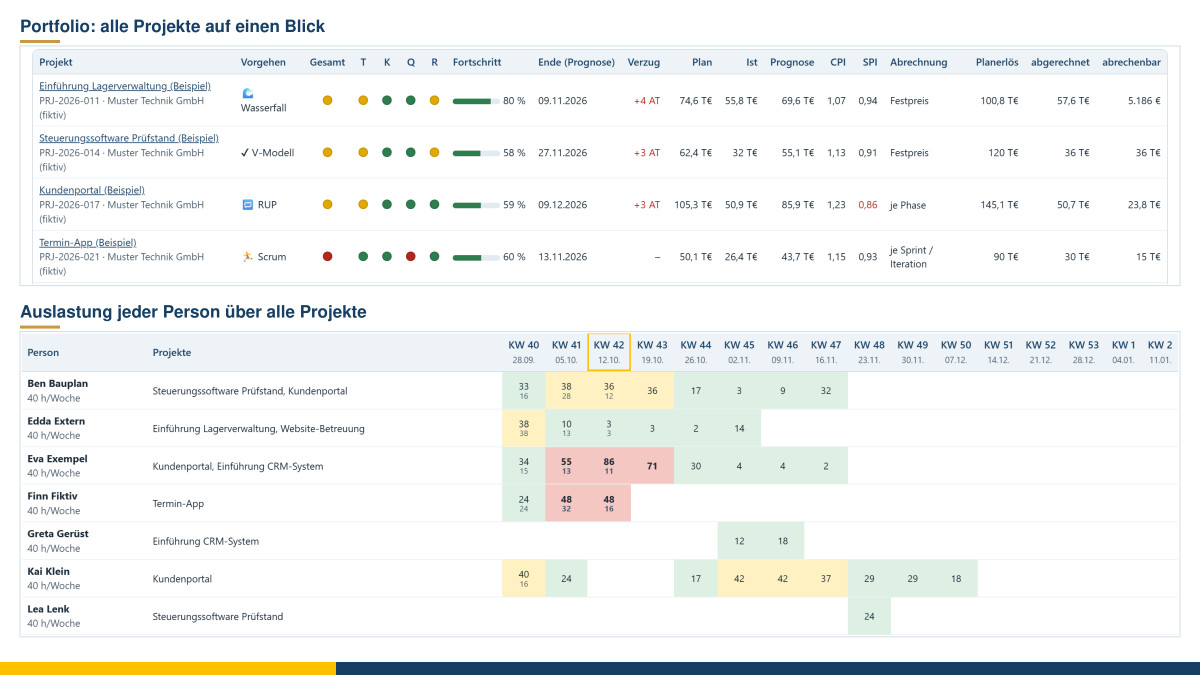
Having a single project under control is one thing. It becomes more difficult when several projects are running at the same time – one at a fixed price following the Waterfall model, another in Scrum sprints, a third as ongoing support billed on a time-and-materials basis. Which one needs attention? Where is money waiting to be invoiced? And who is actually working at one hundred per cent in three projects at once? For these questions, I have built a project analysis tool to go with the project management tool. It reads the project files and analyses them together.
At a glance
- Load several projects: individual project files, an entire folder or the current state from the project management tool in the same browser.
- Portfolio: traffic lights for schedule, costs, quality and risks, progress, forecast end date, cost and schedule index as well as billing per project.
- Dates: durations of all projects with target end date and milestones, plus the next twelve weeks.
- Utilisation across all projects: each person’s planned hours from all projects combined, compared with their weekly hours.
- Billing: planned revenue, invoiced, paid, outstanding, billable now, contribution margin and forecast result – per project and per billing type.
- Costs, agile metrics, individual reports: cost types and personnel costs across all projects, velocity and lead times, all reports of a single project.
- Output: print or save as PDF, key figures as CSV.
- Free and local: free of charge, free software, only reads and transmits nothing.
Portfolio: where are the hot spots?
The portfolio view lists all loaded projects one below the other. For each project, you see the process model, the traffic lights for schedule, costs, quality and risks, the progress, the expected end date and the delay compared with the target. In addition, there are planned, actual and forecast costs, the cost index and the schedule index from the earned value analysis, as well as planned revenue, the amount invoiced and the amount billable.
A chart positions all projects by cost index and schedule index. At the top right are the projects that are cheaper and faster than planned, at the bottom left those that cost more and take longer. The size of the circle represents the planned costs. Below this come the next milestones of all projects and the notes that the projects report themselves: overdue quality gates, overbookings, billable amounts.
Utilisation: who works in several projects?
The planning can be correct in every single project – and yet a person is overbooked because they are scheduled in three projects. The project analysis tool stacks the planned hours of all projects week by week and compares them with the person’s full weekly hours, minus public holidays and absences. Green means within limits, yellow tight, red overbooked. When you point to a week, you see which project claims how many hours.
The tool recognises the same person by the link with the master data tool or by the same name. So if you maintain people centrally in the master data, you get reliable figures here, even if a name happens to be spelt differently in one project.
Billing: what is outstanding, what has been earned?
Projects are billed in different ways: on a time-and-materials basis, at a fixed price with a payment plan, per sprint or iteration, per story point or per phase. The project analysis tool brings all of this together:
- Per project: planned revenue, invoiced, paid, open receivables, billable now, actual costs, contribution margin, margin and forecast result.
- Per billing type: invoiced and billable amounts compared.
- Per type of service: working hours, flat-rate services, materials and goods, third-party services, licences/maintenance/operation and travel costs – invoiced and billable now, per project and in total.
- Per month: invoices issued over the last twelve months, stacked by project.
- Open invoices with due date; overdue ones are marked. If the accounting tool runs in the same browser, the current status of the invoice appears next to it – number, sent, paid.
- Billable now: the items per project by type of service, for example a fixed-price instalment that has been reached, a completed sprint, the hours of the last month or licences procured for the client.
For fixed prices, the tool values the work performed at no less than the share of the contract value that corresponds to progress. This means the contribution margin gives a realistic picture even between two instalments. The forecast result compares planned revenue with the cost forecast and thus shows early on whether a fixed-price project is heading into the red.
Costs, flow and individual reports
The cost view shows actual costs and the forecast per project against the budget, the costs by cost type across all projects and the personnel costs per person together with the billable value. “Agile and flow” summarises sprints, velocity and story points, plus throughput and lead times for Kanban projects. The “Single project” view opens all reports of a project exactly as they appear in the project management tool.
Every view can be printed or saved as a PDF. A complete report brings together portfolio, dates, utilisation, billing and costs. The key figures can also be exported to Excel as CSV.
Data and notes
The project analysis tool runs in your browser; Chrome or Edge are recommended. It only reads the project files and changes nothing in them. If you wish, Chrome and Edge remember the selected folder, so that one click is enough next time. Nothing is transmitted. To try it out, “Examples” loads six entirely fictitious projects, one for each process model, with a partly shared team. Utilisation and time analyses can be used to monitor performance and behaviour; in companies with a works council, their introduction is subject to co-determination. The analyses describe projects – they are not intended to assess individual people. The tool is free of charge and available as free software under the GPL: Open the project analysis tool.
Conclusion
Steering several projects means, above all, seeing in good time where something is getting out of hand – with the dates, with the money and with the people who carry the work. The project analysis tool brings these three perspectives together on one page. If you would like to bring order to your project landscape or set up a project office, you will find more under Project support and coaching and IT-supported organisational consulting. Feel free to talk to me in a free initial consultation.
Sources: Project Management Institute: The Standard for Earned Value Management. 2019. – Project Management Institute: The Standard for Portfolio Management. 4th ed., 2017. – Daniel S. Vacanti: Actionable Agile Metrics for Predictability. 2015. The key figures, names and visualisations in the tool are my own.
Thinking further
You can find more on this topic under resources and downloads – or talk to me directly in a free initial consultation.
Comments
Comments are published immediately with your name. Only the name, title, comment text and time are stored – see the privacy policy.
Loading comments …