
This article was created with the AI assistant Claude and published by Peter Hoenig.
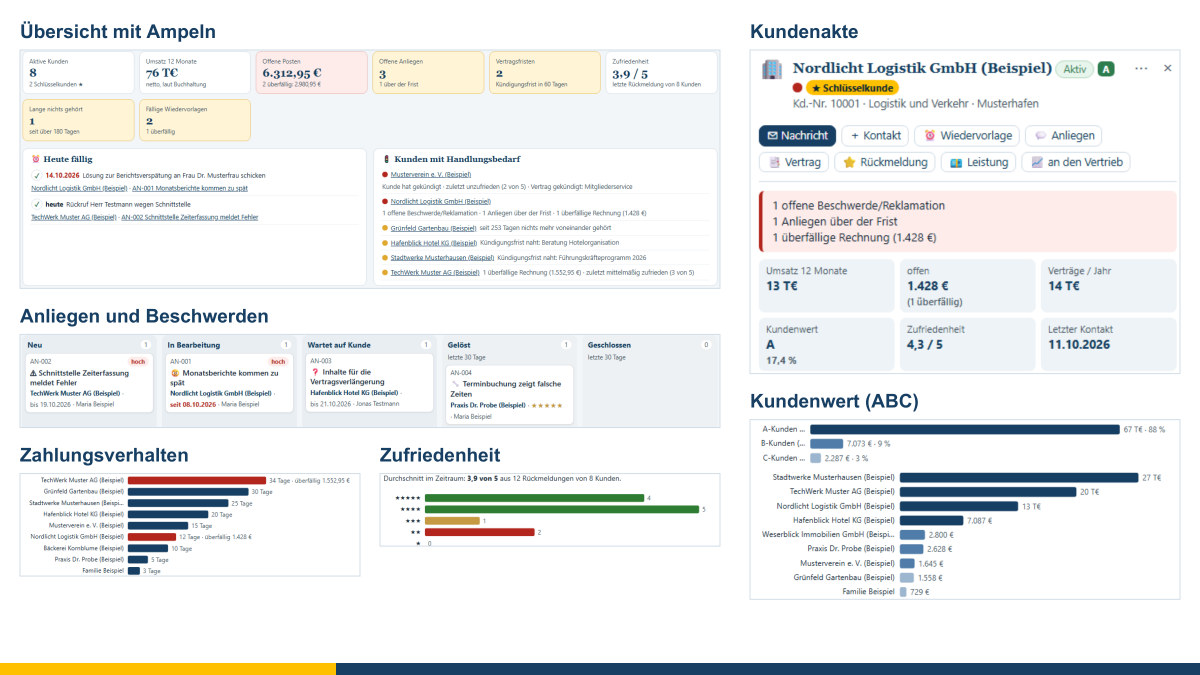
Winning a new customer takes a great deal of time and energy. All the more annoying, then, when a customer relationship later quietly fades away: a complaint is left lying, the deadline for giving notice slips by, the invoice has been outstanding for weeks, and nobody has been in touch for six months. In small and medium-sized enterprises, this knowledge is often spread across different heads, mailboxes and lists. The Kunden-Navigator brings it together in one place. It is a lean tool for looking after your existing customers – and for the contracts with your own service providers. It works together with my Vertriebs-Navigator for sales prospecting, my accounting tool and my master data tool.
At a glance
- Customer record: contact persons and their contact channels, contact history, follow-ups, invoices, requests, contracts and feedback – everything about a customer on one page.
- Traffic lights and overview: Where is action needed? Open complaints, overdue invoices, approaching notice deadlines, dissatisfaction or long periods of silence stand out immediately.
- Requests and complaints: enquiries, claims for defects, faults and even praise, with priority and deadline, on a board from “New” to “Resolved”.
- Contracts and deadlines: term, notice period and automatic renewal – with a reminder before the deadline expires.
- Customers and service providers: contracts, contact persons and invoices kept separately for customers (income) and your own service providers (expenditure).
- Documents: any number of files per contract, customer, service provider or request – in the data set or in a separate document folder.
- Emails: take over emails from Outlook, Thunderbird and other programs and assign them; prepare replies with attachments as a ready-made email file.
- Consents and contact channels: Who consented to what, when and how? Objections block all advertising channels.
- Customer value and satisfaction: an ABC classification by turnover and a satisfaction trend based on your feedback.
- With the accounting tool: turnover and open items per customer, services for invoicing, friendly payment reminders, incoming invoices from your service providers as receipts.
- With sales: Customers you have won come from the Vertriebs-Navigator; additional business goes back as an opportunity.
- Free and local: free of charge, free software, the data remain on your device.
The customer record
Clicking on a customer opens their record on the right. At the top are the most important key figures: turnover, open items, contract value, customer value, satisfaction and the last contact. Below that follow the basic details, the contact persons with their role – for example management, subject-matter contact, accounts, purchasing or IT – the open requests, the contracts, the feedback, the follow-ups and the contact history. So before every call you can see what was last discussed and what is still open.
The overview summarises this for all customers. A traffic light for each customer shows where there are fires to put out; alongside are the follow-ups that are due, the requests past their deadline and the contracts on which you will soon need to act.
Requests and complaints
When a customer gets in touch, you record this as a request: an enquiry, a complaint, a claim for defects, a change request, a fault – or praise. Depending on the priority, the tool suggests a deadline in working days; you adjust the values in the settings. On the board you drag the cards from “New” via “In progress” and “Waiting for customer” to “Resolved”. When closing a request, you record how it was resolved and – if you asked – how satisfied the customer is with the outcome. The reply template inserts the solution straight into the text.
Complaints are unpleasant, but valuable: if you take them seriously and resolve them promptly, you often gain more trust than you had before.
Keeping an eye on contracts and deadlines
For each contract you record the amount and billing interval, start, term, notice period and whether it renews automatically. When a contract renews, the tool rolls the end of the term forward and shows by when notice must be given or the contract renegotiated. With one click, a follow-up is created in good time before the deadline. Contracts that are invoiced regularly create a service for each period, which you pass on to the accounting tool.
Your own service providers too
Contracts are not only made with customers. Tax advice, hosting, software, telephone, insurance, premises or cleaning – here too, deadlines run out, and here too, some contracts quietly renew for another year. That is why you also create your service providers in the Kunden-Navigator, with contact persons, your customer or contract number with the service provider and the contracts on the expenditure side. A partner can also be both, for example a hotel that you advise and where you also book seminar rooms. The “Service providers” view shows costs from contracts, expenditure, unpaid invoices and the next notice deadlines. Customer value, satisfaction and consents for advertising are deliberately reserved for customers.
Documents for contracts, customers and service providers
For every contract, every customer or service provider, every request and every email, you can file any number of documents: the signed contract, amendments, quotations, invoices, notices of termination or minutes. You simply drag the file into the record. The tool often recognises the type from the file name alone; you add the date, title and note yourself. The files are initially kept in the data set and travel with your file when you save. If you have many or large documents, it is better to choose a separate document folder – for example in your cloud storage. There, a subfolder is created for each customer or service provider and for each contract, and the files remain perfectly readable even without the tool.
Emails from Outlook, Thunderbird & Co.
Much of what is agreed with customers and service providers is in emails. The Kunden-Navigator takes them over as files: from classic Outlook you simply drag an email onto the desktop or into a folder; from Thunderbird, the new Outlook or webmail you save it as a file. You then drag the file into the Navigator. Sender, recipients, date, subject, text and attachments are taken over, and the attachments become documents. The tool suggests where the email belongs – via the known address of a contact person, the company's internet domain or a contract or request number in the subject line – and you confirm or change this. Every email taken over appears in the contact history. It also works without a file via the clipboard, but then without attachments.
Conversely, you prepare messages in the Navigator – from templates, as a reply to an email you have taken over or to send a document – and attach documents. The result is a ready-made email file: classic Outlook opens it with a double-click as a draft, which you check and send. Thunderbird initially displays it as a message; editing it as a new message turns it into a draft. For the new Outlook and webmail there is also a link that opens your email program with recipient, subject and text – you add attachments there yourself. Afterwards you log the message, and it is in the record together with its attachments. The tool does not retrieve any mailbox, does not log in to any service and does not send anything itself.
Consents and permitted contact channels
Not every message to a customer is advertising. Service messages about a contract, invoice or request need no consent. For advertising – which also includes offers, newsletters and satisfaction surveys by email – the rules of competition law apply (Section 7 of the German Act against Unfair Competition, UWG): by email, as a rule, only with prior express consent, although an exception may apply for existing customers; advertising calls to private individuals only with consent; advertising by post until the recipient objects.
For each contact person, the Kunden-Navigator records what consent was given for, when and through which channel, and where the evidence is kept. If someone objects to advertising, the tool blocks all advertising channels for that person. Your templates are marked as “Service” or “Advertising”; for advertising, the tool shows what has been recorded before you prepare the message. Under “Consents and data protection” you will find all the evidence, the objections, former customers for checking whether their data are still needed, and a response to an access request under Art. 15 GDPR for printing.
These are working aids, not legal advice. Please have your approach and your templates checked in each individual case.
Customer value and satisfaction
Customer value classifies your customers as A, B or C according to their turnover over the last twelve months: the largest, which together account for 80% of turnover, are A customers, those up to 95% are B customers, the rest are C. You can change the thresholds. Without a connection to the accounting tool, the tool works with the annual value of the contracts. Satisfaction is derived from your feedback on a scale of 1 to 5 and from resolved requests.
Both merely describe your own data. Neither is an assessment of people – and a C customer deserves good care just as much. The classification does, however, help with the question of where a regular conversation is particularly worthwhile and where a customer may not have heard from you for too long.
Working with the accounting tool
Invoices, invoice numbers, receipts and payments are created only in the accounting tool; it remains the leading system. The Kunden-Navigator feeds into it in four ways:
- Turnover and open items: With “Connect to accounting” you ask my accounting tool to provide its customer status in the same browser – turnover, open invoices and payment behaviour per customer. Customers are matched via the customer number, otherwise via the name.
- Services for invoicing: You hand over services you have provided for the customer, or contract periods that are due, collected per customer. The accounting tool creates an invoice draft from them; status, number, dispatch and payment come back. If a draft is discarded or an invoice cancelled, the services can be invoiced again.
- Payment reminders: If an invoice is overdue, you prepare a friendly reminder from a template and log it; a follow-up reminds you to check whether payment has been received. Dunning fees, default interest and court dunning proceedings are deliberately not provided for.
- Incoming invoices from your service providers: An invoice that you have filed with the service provider or contract, or taken over from an email, can be passed to the accounting tool with one click, together with the file, invoice number, date and amount. There it becomes a receipt; you choose the receipt type and tax case in the accounting tool, and with e-invoices it reads the details itself. The receipt number and payment then appear in the Kunden-Navigator, as do the expenditure and unpaid invoices per service provider.
You hand over customers who do not yet exist in the accounting tool; conversely, you can take over customers from the accounting tool. If you work in different browsers or on different devices, everything also works via files.
From sales to customer care – and back
You win new customers with the Vertriebs-Navigator. Once an opportunity has been won there, you hand the customer over to the Kunden-Navigator with their contact persons, their consents or objections and the contact history so far. The customer appears in the overview and is taken over with one click. If you spot a need for more with a customer, you pass this additional business back to sales as an opportunity. Its phase and outcome then appear in the customer record. This keeps the division of labour clear: sales takes care of new business, customer care looks after the existing relationship.
If you wish, you can link customers and contact persons with my master data tool so that names, addresses, customer numbers and contact details are maintained in one place only. Without this link, the Kunden-Navigator works on its own.
Reports
The reports show the distribution by customer value, turnover per customer, payment behaviour, the trend in satisfaction, requests by type and processing time, expiring contracts and the state of customer care – for example, with which customers the last contact was a long time ago. Everything can be printed, saved as a PDF or used further in Excel as CSV. You can import existing customer lists from CSV or Excel.
Where the data are stored
The tool runs entirely in your browser. You save your data as a file on your computer; an interim state remains in your browser's storage. Documents are kept in the data set or in the document folder you choose yourself. Nothing is transmitted over the internet, not even to me. Messages are only prepared – as an email file, as a link for your email program or for copying; nothing is sent automatically. As the file contains personal data, please back it up regularly and protect your device. An entirely fictitious example shows all the functions before you enter your own data.
Relation to the 8-Level Model
In my 8-Level Model, customer care does not stand on its own. Which customers you look after, and how, follows from your vision, mission and goals; the care itself is a process carried by people – the tool merely supports them. A good tool is no substitute for an open conversation, but it ensures that nothing is forgotten. That is why the guiding question of my work applies here too: Does it serve people – your customers just as much as the people in your company who look after them?
The tool is an aid for organising your own customer care. It replaces neither accounting or legal advice nor a review under data protection or competition law. Please back up your data regularly.
Conclusion
The Kunden-Navigator brings together the customer record, service providers, requests, contracts with their documents, emails, consents, customer value and payment status in one tool – without a subscription and without transferring data to the web. It is free of charge and available as free software under the GPL: Open the Kunden-Navigator. If you would like to set up your customer and sales processes more clearly overall, I will gladly support you with process management consulting. Talk to me in a free initial consultation.
Sources: German Act against Unfair Competition (Gesetz gegen den unlauteren Wettbewerb, UWG), Section 7 (unacceptable nuisance), in particular subsections 2 and 3 (existing customers). – General Data Protection Regulation (GDPR), Art. 7 (demonstrating consent), Art. 15 (right of access), Art. 17 (erasure) and Art. 21 (right to object). – ABC analysis as a widely used method in business administration. – Email files according to the internet standards RFC 5322 and MIME (RFC 2045 et seq.); Outlook messages (.msg) according to Microsoft's open format specification [MS-OXMSG]. – Outlook is a trademark of Microsoft Corporation, Thunderbird a trademark of the Mozilla Foundation; the names are used for descriptive purposes only.
Thinking further
You can find more on this topic under resources and downloads – or talk to me directly in a free initial consultation.
Comments
Comments are published immediately with your name. Only the name, title, comment text and time are stored – see the privacy policy.
Loading comments …