
This article was created with the AI assistant Claude and published by Peter Hoenig.
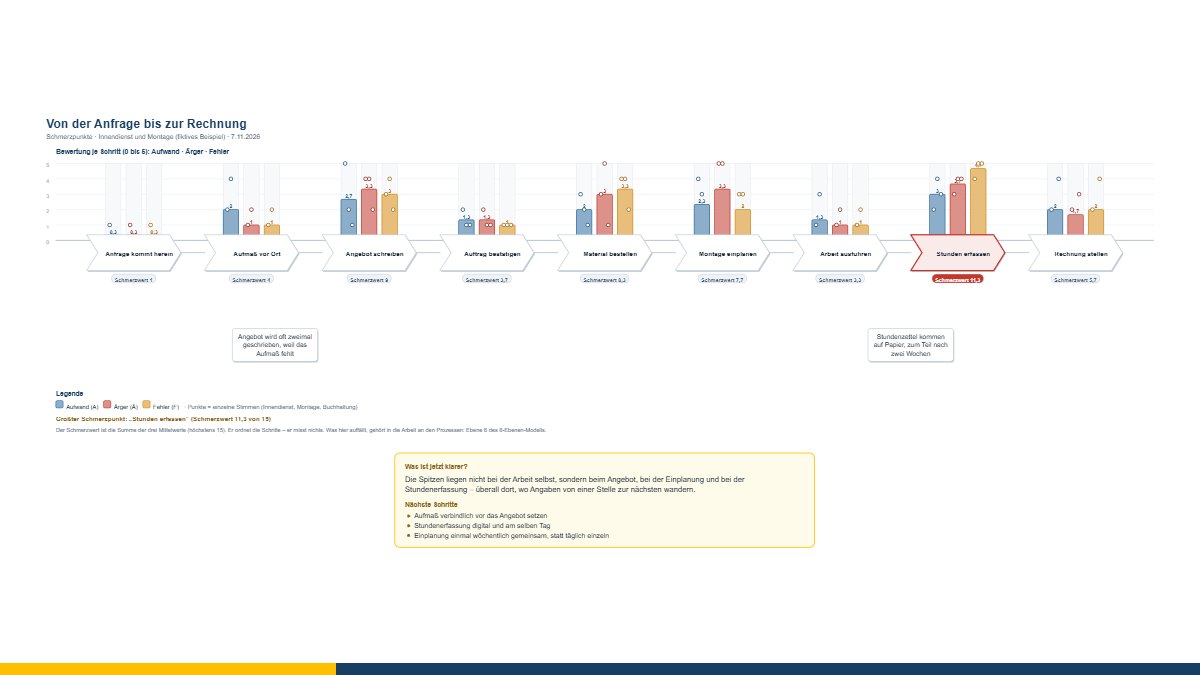
“Things don't run smoothly here” is the most common sentence I hear in first conversations – and the least usable. It is always true, and you cannot do anything with it. The new tool pain points in the process turns it into something you can work on, with remarkably little effort: the process stands there as a chain of steps, and above each step are three bars.
Why three measures and not one
Keeping them apart is the whole trick. A step can take a lot of effort and still annoy nobody – site measurements, for instance. And a short step can ruin the whole week if it regularly goes wrong. Anyone who only asks “how bad is it?” gets a number that cannot be used for anything.
- Effort – how much time and effort does this step cost?
- Trouble – how often is there trouble, queries or waiting here?
- Mistakes – how often does something go wrong here or have to be redone?
Three answers, three different measures. A lot of effort calls for automation, a lot of trouble for an agreement, a lot of mistakes for a better template or a check in the right place.
The places where everyone disagrees
This is the part I find most interesting myself. The analysis explicitly names the steps where the assessments of those involved differ by three points or more.
Such places are often more revealing than the ones everyone agrees on. There people work differently and know different workarounds – or one person carries a load the others simply know nothing about. In the example the office rates “write the quote” with effort 5, the fitting team with 2 – and the fitting team rates “order material” with trouble 5, the office with 3. Both figures are right. Both describe the same process.
Where the pain usually sits
In the built-in example – a business from enquiry to invoice – the peaks are not at the work itself. “Carry out the work” is the calmest step in the whole process. It hurts at the quote, at the scheduling and at the time recording.
That is no coincidence but almost a rule: the pain sits at the handovers, where information travels from one place to the next. Then the right question is not “how do we make this step faster?” but “why does the information have to be recorded twice at all?”.
The bridge to the 8-Level Model
What stands out here belongs in the work on the processes – level 6 of my 8-Level Model. And from there the path often leads on: to level 7 (organisation) when responsibilities are unclear, and to level 8 (tools and IT systems) when the same piece of information is entered three times.
That is exactly what the tool is built for: as a starting point that produces a solid list in an hour of team conversation – not as a process management system.
What it does not do
The ratings are assessments by those involved, not measurements. The pain score ranks the steps; it measures nothing. It is a reflection and conversation model, not a diagnostic instrument – and what is rated are steps, not people.
Please bear in mind when saving: with the names of those involved it is possible to trace who rated what. Agree beforehand who gets to see the file – or work with roles instead of names.
Your data stays with you
The tool transmits nothing; it saves as a file *.schmerzpunkte.json. Merely opening the tool stores nothing in the browser. Exports: PDF, PowerPoint, LibreOffice Impress, Visio, SVG, PNG, a record with all mean values and individual voices, and CSV for Excel.
The tool is free of charge: open the pain points tool. If you would like to put the processes, responsibilities and IT systems in your company in order, I am happy to support you with IT-supported organisational consulting – get in touch for a free initial consultation.
Open or download the tool
- Pain points in the processOpen Download (463 KB)
Thinking further
You can find more on this topic under resources and downloads – or talk to me directly in a free initial consultation.
Comments
Comments are published immediately with your name. Only the name, title, comment text and time are stored – see the privacy policy.
Loading comments …