
This article was created with the AI assistant Claude and published by Peter Hoenig.
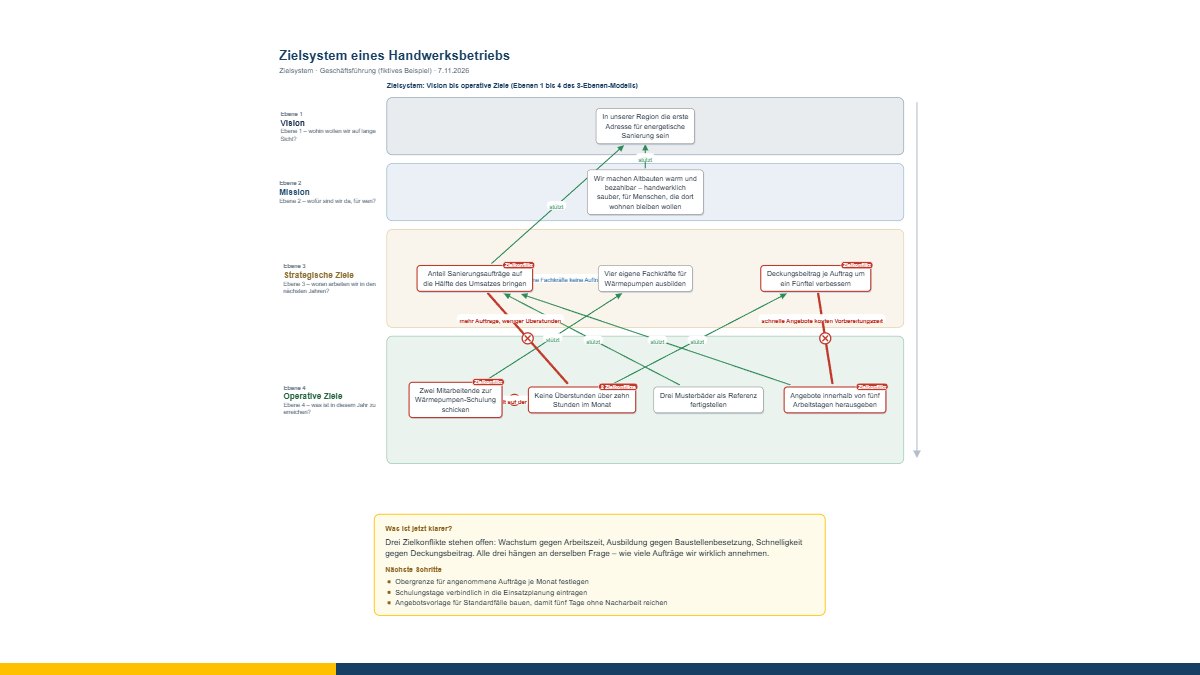
A workshop is good if something moves on afterwards. With the goal system you clarify vision, mission, strategic and operational goals – and above all the goal conflicts. With the pain points those involved rate where a process hurts. Afterwards, both belong in the overall picture of the company, that is in the 8EM Modeller. Until now that meant typing it all up again. Now it takes one click.
How it works
In the goal system and in the pain points there is a section on the right, “📤 To the 8EM Modeller”. One click hands over the picture shown. In the 8EM Modeller choose “Import ▾” and then “🎯 Goal system from the coaching tool” or “🩹 Pain points from the coaching tool”. A preview shows what will be created, what updated and what assigned to an existing element. One click on “📥 Take over” – and a single step undoes it if it does not fit after all.
In the same browser no file is needed. In the MC4Y productivity suite the handover runs through your own server, so it also works between different computers. And where neither fits, simply choose the tool’s saved file in the Modeller.
Goal conflicts belong in the model
A goal system that only lists everything that is to be achieved keeps quiet about the real work. That is why every goal conflict comes along when you take it over: it is kept on both goals in the model, the card carries a ⚡, and the model check lists all goals with open conflicts. So it stays visible where a decision is still due – priority, balance or a changed goal.
Responsibility only in one place
“Who is responsible for it?” is recorded in the goal system as a person or role, from the master data if you wish. In the Modeller it ends up with a role or person of the organisation (level 7a) – found via the master data identifier or the name; missing ones are created there. That way no second, loose list of names grows next to the organisation.
Pain points onto the process
The rating from the pain points – for each step effort, trouble and errors, the pain score and how far the assessments differ – is attached as a status to one process on level 6. If you wish, it sets the process’s “Pain points” field and creates the steps as sub-processes. Who rated how is deliberately not passed on: steps are rated, not people.
Nothing twice – and a way back
If you hand over again after the next workshop, the new state replaces the old one. The Modeller recognises the goals and updates them instead of creating them a second time; anything you have renamed in the model in the meantime keeps its name. In the other direction, the tool learns when and into which model it was taken over – and, after every save of the model, what the goals are called there or that one was removed.
Your data stays with you
Nothing is handed over unless you click the button, and only to where you work anyway: your browser’s storage or the server of your own suite. It is a model for reflection and conversation, not a diagnostic instrument – the model orders and shows connections, you make the decisions.
Goal system, pain points and the 8EM Modeller are free: goal system, pain points, 8EM Modeller. If you would like to bring goals, processes and organisation together in your company, I will gladly support you in IT-supported organisational consulting – get in touch for a free initial consultation.
Open or download the tools
- Goal system with goal conflictsOpen Download (682 KB)
- Pain points in the processOpen Download (677 KB)
- 8EM modellerOpen Download (3.6 MB)
Thinking further
You can find more on this topic under resources and downloads – or talk to me directly in a free initial consultation.
Comments
Comments are published immediately with your name. Only the name, title, comment text and time are stored – see the privacy policy.
Loading comments …