
This article was created with the AI assistant Claude and published by Peter Hoenig.
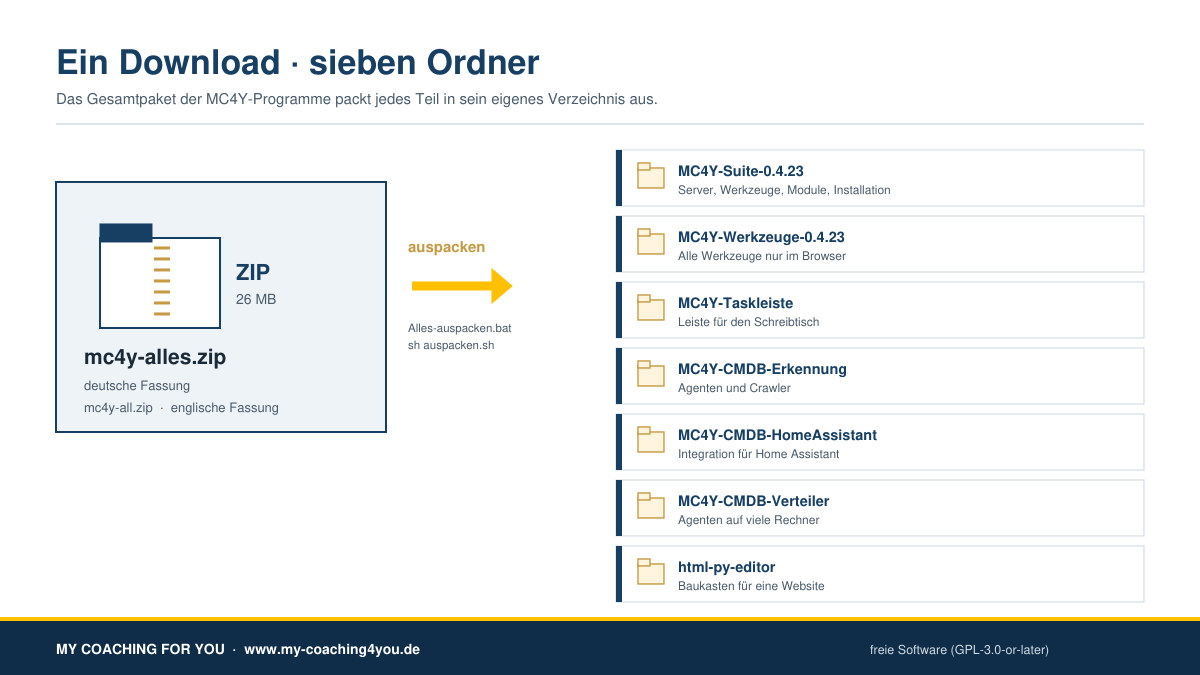
My programs have grown over the years: the productivity suite, the tools for the browser, the desktop taskbar, the agents and crawlers for the CMDB, the roll-out helper for many computers and the HTML-PY editor. Anyone who wanted to try everything had to download seven files one by one. That is now a single step: there is a bundle.
At a glance
- One download, everything inside: mc4y-all.zip – about 26 MB.
- German version: mc4y-alles.zip with German instructions. The programs inside are the same; they switch between German and English by themselves.
- Every part in a folder of its own: inside the bundle each program stays a ZIP file. A double-click on “Unpack-all” (Windows) or
sh auspacken.sh(Mac, Linux) unpacks them all – one folder per program. - Nothing is installed: unpacking alone changes nothing on your computer. Afterwards you install only what you really need.
- You can leave things out: if you only want the tools, unpack that one package and delete the rest.
- Single downloads continue: every program is still available on its own – if you only need the taskbar, you still download only the taskbar.
- Trial version: free software (GPL-3.0-or-later), without warranty. Unpacking has been tested on Windows; on Mac and Linux only the logic has been checked so far, not the real run.
What is in the bundle
The subfolder “pakete” (German for “packages”) holds these seven files. On the right you see the folder that appears when you unpack it:
- mc4y-suite.zip – the full suite: server, all tools, the modules (documents, wiki, notes, tasks, calendar, CMDB, solution database), the installation for Windows, Linux and macOS, and the manual → folder “MC4Y-Suite-…”
- mc4y-werkzeuge.zip – all tools in the browser only, without installation and without a login. The easiest way, and it works on older machines → folder “MC4Y-Werkzeuge-…” (Werkzeuge = tools)
- mc4y-taskleiste.zip – the bar for your desktop. It connects to a suite, but it also works without one → folder “MC4Y-Taskleiste” (Taskleiste = taskbar)
- mc4y-erkennung.zip – agents and crawlers that report devices and installed software to the CMDB (Windows, Linux, Raspberry Pi, macOS, Android) → folder “MC4Y-CMDB-Erkennung” (Erkennung = discovery)
- mc4y-cmdb-homeassistant.zip – the integration for Home Assistant → folder “MC4Y-CMDB-HomeAssistant”
- mc4y-verteiler.zip – “Connect devices”: rolls the agents out to many computers at once → folder “MC4Y-CMDB-Verteiler” (Verteiler = distributor)
- html-py-editor.zip – the builder for a website of your own, with upload over SFTP → folder “html-py-editor”
Each of these folders has instructions of its own: “README.txt” in English, “LIESMICH.txt” in German.
How to unpack it
Windows 10 and 11
- Right-click “mc4y-all” in your “Downloads” folder, then “Extract All …” and “Extract”.
- Open the new folder “MC4Y-All-…”.
- Double-click “Unpack-all”. It first shows what it is going to unpack and asks before it refreshes a folder that already exists.
- If Windows warns you with “Windows protected your PC”: click “More info” and then “Run anyway”.
Mac (macOS 12 or newer)
Here the Terminal is worth it (cmd + space, type “Terminal”). The reason: the macOS archive utility sometimes loses the execute permission of the start scripts.
ditto -x -k ~/Downloads/mc4y-all.zip ~/mc4yxattr -dr com.apple.quarantine ~/mc4ycd ~/mc4y/MC4Y-All-…and thenbash auspacken.sh
Linux, Raspberry Pi too
cd ~ && unzip -q ~/Downloads/mc4y-all.zipcd MC4Y-All-…and thensh auspacken.sh
Every script knows --dry-run, so you can see the list without anything happening. If you prefer to work by hand, unpack the files in the folder “pakete” one by one; the result is the same.
Why the programs stay ZIP files inside the bundle
I could have put everything in one big folder, already unpacked. Two things from practice speak against it.
First, the execute permissions: the start scripts for Mac and Linux have to be executable. A ZIP file only carries that permission when it was written with a Unix marker – repack it on Windows and the permission is gone, so on a Mac you would read “Permission denied”. Because every program keeps its own, unchanged ZIP file, the permission survives.
Second, leaving things out: this way you can simply skip single parts – and if you like, you can compare the checksums of the packages inside the bundle with those of the single downloads. They are identical, byte for byte.
German or English
There are two versions because the instructions need a language: “mc4y-alles.zip” with “LIESMICH.txt”, “mc4y-all.zip” with “README.txt”. The unpack scripts speak both languages; which one they use is written in the file “sprache.txt” inside the bundle and can be overridden with --lang de or --lang en. The programs themselves switch with “DE | EN” at the top right anyway.
What the bundle does not do
It installs nothing, starts no program, downloads nothing from the internet and sets up no autostart. It unpacks ZIP files – nothing more. What gets installed afterwards you decide step by step with the instructions in each folder; the step-by-step guide to the suite covers the routes “browser only”, Windows, Mac and server.
If your antivirus speaks up about the unpack scripts anyway: unpack the packages by hand. The result is the same and you lose nothing.
Questions or feedback? Write to me – with instructions in particular, every hint about what was unclear helps me.
Thinking further
You can find more on this topic under resources and downloads – or talk to me directly in a free initial consultation.
Comments
Comments are published immediately with your name. Only the name, title, comment text and time are stored – see the privacy policy.
Loading comments …