
This article was created with the AI assistant Claude and published by Peter Hoenig.
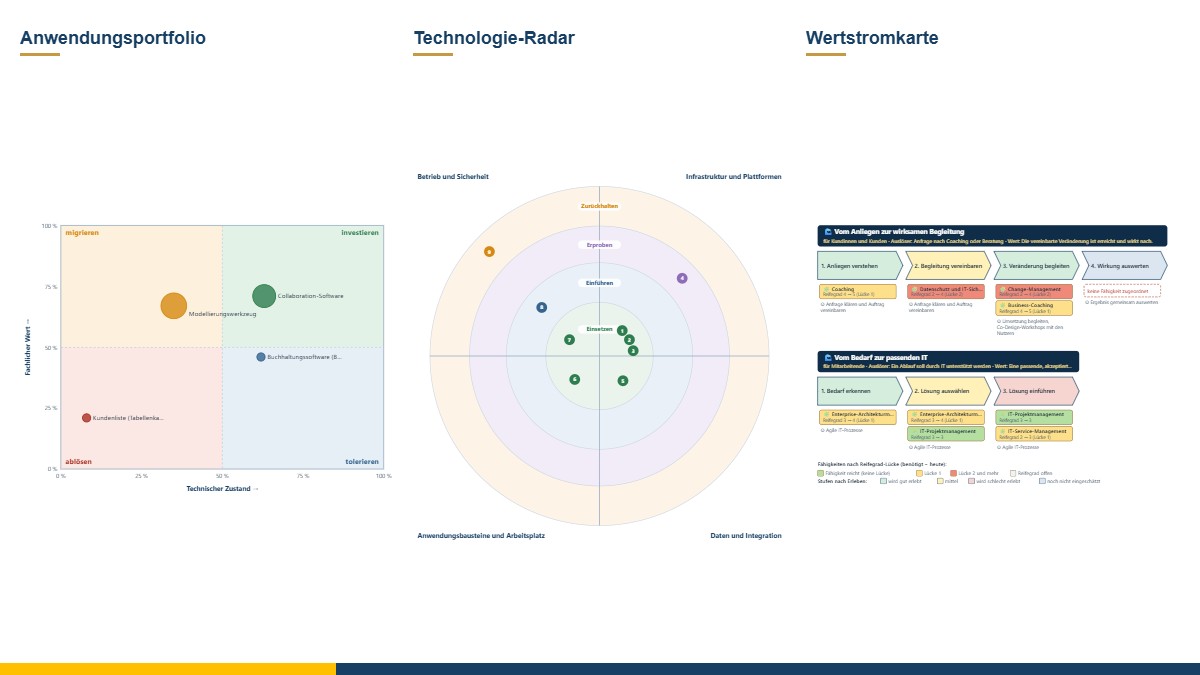
At its core, enterprise architecture management (EAM) answers three questions: What do we have? Where do we want to go? And in what order do we take the steps? Large companies use extensive software and dedicated teams for this. Small and medium-sized enterprises need the same way of thinking – but in a form that a few people can maintain alongside their other work. That is why I have built the most important architecture management tools into my 8EM Modeller, where they are directly linked to goals, capabilities, processes and organisation.
At a glance
- Application portfolio: assess IT systems by business value and technical condition and decide on their future.
- Migration assessment: record for each system whether it stays, moves, is renewed, replaced or switched off.
- Interface catalogue and data flow map: who exchanges which data with whom – and where data is still transferred manually.
- Technology radar: which technologies are standard, being introduced, being trialled or held back – optionally also by whether they are developed in-house or bought.
- Prioritisation of initiatives: rank projects according to transparent criteria and match them against the budget.
- Architecture governance: record decisions, time-limited exceptions and reviews.
- Value streams and glossary: the path to customer value and a common language.
- Exchange: bulk import from Excel and exchange in the ArchiMate® format.
What do I have? – Inventory and assessment
Application portfolio: Each IT system is assessed according to business criteria – how well it covers the tasks, which processes and goals depend on it, how many people use it, whether it serves people – and according to technical criteria such as condition, operation, security, maintainability, integration and costs. The weightings can be adjusted. The portfolio chart shows all systems at a glance, with the size of the circles representing the costs. This results in a suggestion – invest, tolerate, migrate or phase out – but you make the decision yourself, with a date and a justification.
Interface catalogue: Each interface is given a number, technology, frequency, responsibility and the data transferred. It has a direction – if data flows back and forth, there are two interfaces – and a status from “in planning” through “in operation” to “decommissioned”; a context diagram shows a system with its neighbours up to five steps away. The data flow map shows the connections as a picture, a matrix as a table. Manual transfers – known as media breaks – and personal data are highlighted, because that is often where errors and risks lie.
Glossary: terms with a definition, synonyms, delimitation and an example. The Modeller points out when a word is used several times with different meanings – a common and often underestimated source of misunderstandings between business departments and IT.
Where do we want to go? – Goals, standards and value streams
Value streams describe in a few stages how value is created for customers – from the initial request to the result. Below each stage, the value stream map shows the capabilities, processes and IT systems that support it, and makes gaps in maturity visible.
Technology radar: For each component and platform, you define whether it is standard or is being introduced, trialled or held back. The radar turns this into a picture that is easy to discuss with everyone involved – and that makes technologies being phased out visible early on. A second view classifies the same technologies by whether they are developed in-house or bought, in each case as standard or non-standard.
Migration assessment: For each IT system, you record where the journey is heading: retain, move unchanged, move to a new platform, redevelop, replace with a standard solution or switch off – with target, date and effort. The Modeller provides notes derived from the model, for example if personal data is to move to a provider outside the EU. These are prompts for asking questions, not a legal assessment.
In what order? – Prioritisation and governance
Prioritisation of initiatives: Projects are assessed according to criteria such as strategic alignment, benefit, urgency, impact on people, contribution to the architecture, and risk and effort; you decide on the weightings. The ranking shows which initiatives fit within the budget, and a chart compares value with burden.
Architecture governance: Important architecture decisions are recorded briefly – starting point, decision, alternatives, consequences, follow-up date. Exceptions to a standard are approved for a limited period and given a compensating measure; the Modeller reports expired exceptions. Reviews check larger initiatives against fixed checkpoints before implementation. As everywhere in the Modeller, the people responsible are selected from the central organisation.
Data in and out
- Bulk import: Lists from Excel or CSV are assigned to a level, and the columns are largely recognised automatically; entries with the same name are updated rather than duplicated. An import template helps you get started.
- ArchiMate®: export and import in The Open Group's exchange format for ArchiMate models.
- Questionnaires: The EAM maturity check and the IT survey form can be opened from the Modeller; their results flow directly into the model.
- Reports: For each tool there is a report with charts and tables, plus the report pack “Architecture management”. Output as PDF, Word document or CSV.
Why in the 8EM Modeller?
The tools are not an end in themselves. Their value comes from the connections: an IT system in the portfolio is linked to the processes it supports and to the capabilities and goals behind them; an interface knows the data objects and their protection requirements; an initiative knows its to-be picture. This makes it possible to answer questions that separate lists cannot – for example, which core processes depend on a legacy system that is due to be replaced. And above everything stands the guiding question of the 8-Level Model: Does it serve people?
You can read more about the Modeller itself in the post Mapping a company in the 8-Level Model. It is being developed continuously; you will find a trial version under Experimental – to try out.
The tools support assessment, dialogue and decision-making. They do not replace specialist advice in individual cases, legal advice or operational implementation.
Conclusion
Good architecture management does not need a large department, but rather a few well-connected tools and the willingness to take a regular look. If you would like to make a start in your company, I will be glad to support you with enterprise architecture management. The posts Enterprise architecture management: why SMEs need it and TOGAF 10: the toolkit for structured architecture work also offer an introduction to the subject. Get in touch for a free initial consultation.
Sources: Nygard, M. (2011): Documenting Architecture Decisions. Blog post, Cognitect. – The Open Group: ArchiMate® Model Exchange File Format for the ArchiMate Modeling Language. Reading: The Open Group.
Trademark notice: ArchiMate® and TOGAF® are registered trademarks of The Open Group. The names are used for descriptive purposes only; there is no connection with the trademark owners.
Thinking further
You can find more on this topic under resources and downloads – or talk to me directly in a free initial consultation.
Comments
Comments are published immediately with your name. Only the name, title, comment text and time are stored – see the privacy policy.
Loading comments …