
This article was created with the AI assistant Claude and published by Peter Hoenig.
Architecture management sounds like something for large corporations with a department of their own. Yet the basic questions arise in every small and medium-sized enterprise: Which IT systems do we actually have? Who is responsible for them? Which processes depend on them, and what happens if one of them fails? Before introducing tools, it is worth taking an honest look at where you stand – and carrying out a joint inventory. I have developed two questionnaires for this.
At a glance
- The EAM maturity check is a self-assessment in ten areas, today and desired.
- It shows the result as a radar chart and names the three areas with the greatest leverage – with recommendations for getting started.
- The IT survey form helps business departments and system owners to describe their IT systems in a structured way.
- Both questionnaires are free of charge, run in your browser and can be imported into my 8EM Modeller.
The EAM maturity check
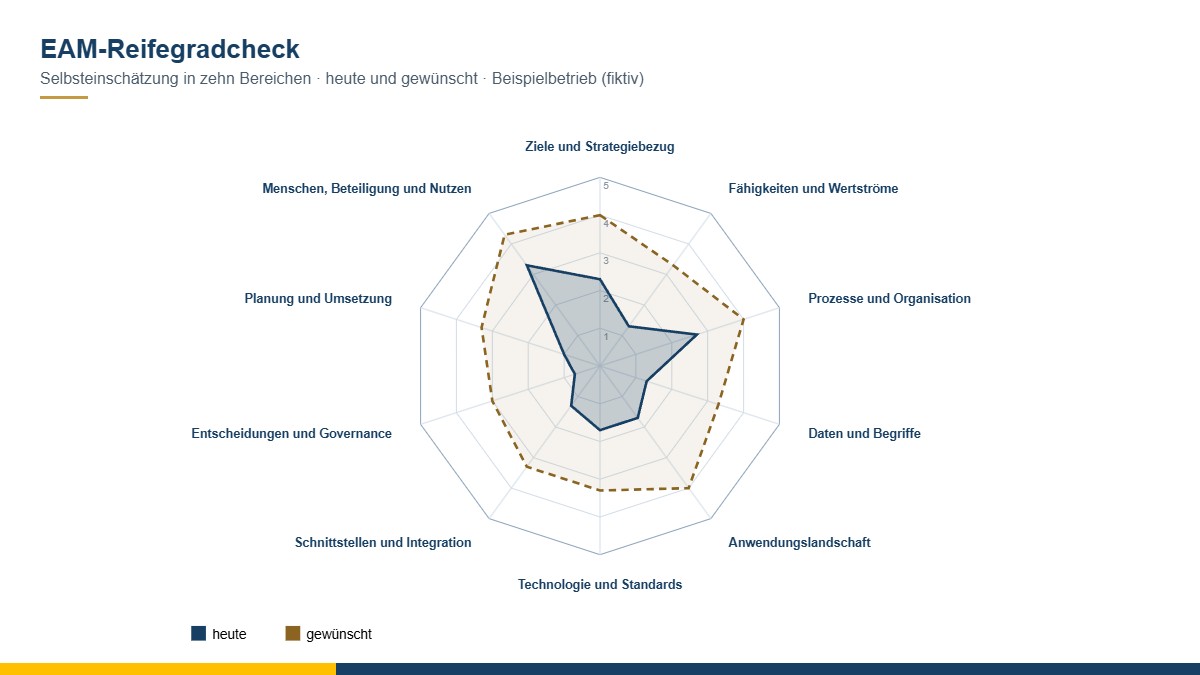
The maturity check covers ten areas based on my 8-Level Model: goals and strategic alignment, capabilities and value streams, processes and organisation, data and terms, application landscape, technology and standards, interfaces and integration, decisions and governance, planning and implementation, and people, participation and benefit. There are three statements per area, one in the short version. For each, you assess how far the statement applies today – from “not at all” to “complete” – and, if you wish, how it should be.
The result shows a radar chart with “today” and “desired”, a table with a classification for each area – from “hardly present” to “lived and continuously improved” – and the three areas in which the gap is greatest, each with a recommendation for a first step. The check also works well for a small group made up of senior management, IT and the business departments: where the assessments diverge, the real conversation begins.
The levels are modelled on the usual structure of maturity models; the statements and recommendations are my own wording. The questionnaire is a self-assessment and has not been scientifically validated. Open the EAM maturity check in your browser.
The IT survey form
If you want to understand the IT landscape, you have to ask the people who work with it every day. The survey form is aimed at business departments and system owners. Each IT system has its own tab with:
- Profile: name, purpose, type, vendor or product, standardisation (in-house development or purchased solution) and where the system runs – in-house or with which provider.
- Lifecycle: one date per phase – from the idea through project, introduction and operation to decommissioning. The current phase follows from these dates.
- Responsibility and use: Who looks after the system on the business and the technical side, which departments are responsible, who uses it?
- Data: Which data does the system maintain itself, which does it only read, does it include personal data?
- Operation and emergency: tolerable downtime and tolerable data loss, existing emergency plans.
- Interfaces: With which systems is data exchanged – including manually? For each interface, the direction (sends or receives) and the status, for example “in planning” or “in operation”.
- Costs: licences, maintenance, operation and purchase, as far as known.
- Assessment: business value and technical condition according to the same criteria as in the application portfolio.
At the end there is a summary. The form can be saved as an interim state, printed and passed on as a file. Open the IT survey form in your browser.
Working together with the 8EM Modeller
Both questionnaires work on their own. If you work with my 8EM Modeller, however, you can also open them directly from it: the survey form is then pre-filled with the IT systems already known, and at the click of a button the answers flow into the model – new IT systems, people responsible, interfaces and assessments. The result of the maturity check appears in the Modeller alongside indicators that emerge from the model itself, such as how many IT systems have already been assessed.
Both questionnaires run entirely in your browser and do not transmit any data to me or to third parties; you save the results as a file on your computer. They are free of charge and available as free software under the GPL.
The maturity check is a self-assessment for orientation, not an audit and not a certification.
Conclusion
An honest assessment of where you stand and a joint inventory are the best way into architecture management – without any big tool. If you would like to know which next steps make sense for your company, I will be glad to support you with enterprise architecture management. You can read more on the subject in the post Enterprise architecture management: why SMEs need it. Get in touch for a free initial consultation.
Thinking further
You can find more on this topic under resources and downloads – or talk to me directly in a free initial consultation.
Comments
Comments are published immediately with your name. Only the name, title, comment text and time are stored – see the privacy policy.
Loading comments …