
This article was created with the AI assistant Claude and published by Peter Hoenig.
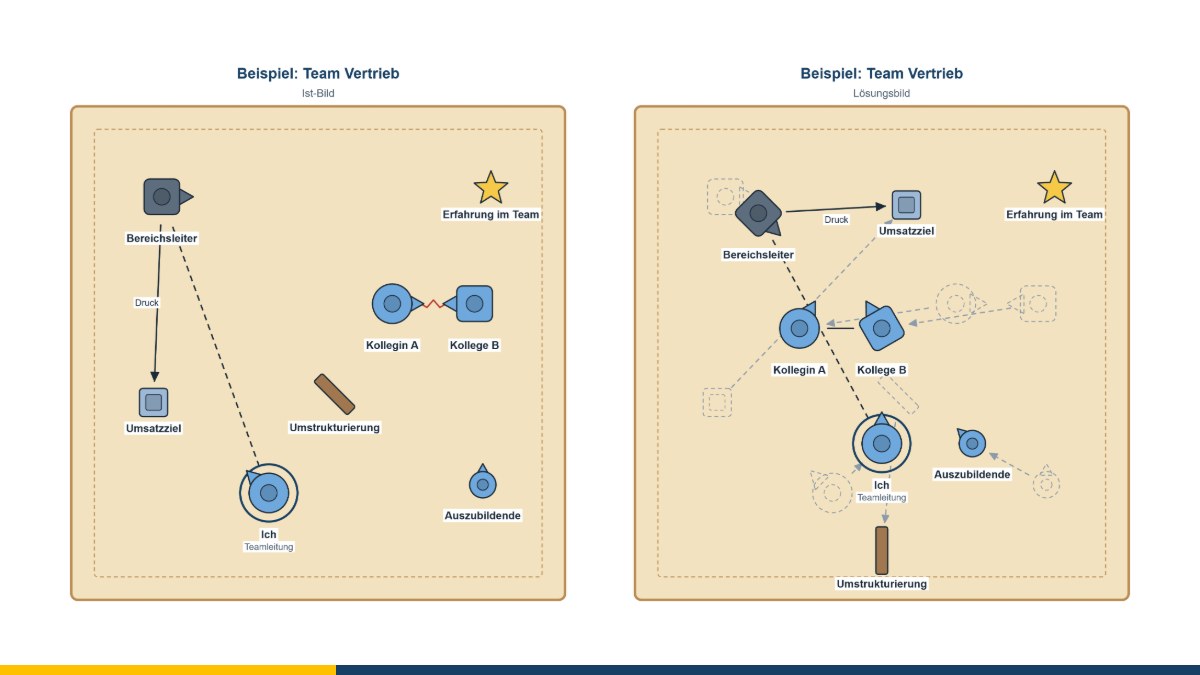
Who is close to whom? Who is looking where? Who is standing apart? Such questions are often easier to answer with figures than with words. The systemic board is a board with wooden figures on which people set up their relationships in teams, families or organisations. The picture makes patterns visible – and can be changed until a coherent solution emerges. For digital work, I offer the systemic board in two forms: as a flat board and as a 3D board on which you can switch to the point of view of each figure.
At a glance
- On the systemic board, figures stand for people, groups or topics.
- Distance, direction of gaze and size show how relationships are experienced.
- The method goes back to the family board developed in the 1980s.
- The free systemic board editor recreates the board digitally – including for coaching by video.
- The 3D systemic board shows the same constellation in three dimensions and from the point of view of each figure.
Aim of the method
The systemic board helps you to look at a system “from the outside”. The very act of setting it up brings clarity: Who belongs to it, who is missing? Who is at the centre, who on the edge? Where are the figures looking – at each other, past each other, at a goal? Changes can then be tried out: What changes if a figure takes a step or turns around? This produces solution pictures and ideas for first steps – without the real people involved having to be present.
Typical occasions in coaching are conflicts within a team, new leadership roles, restructuring or decisions that affect several people.
Where the method comes from
The family board was developed in the early 1980s by Kurt Ludewig and colleagues in Hamburg as a procedure for representing family relationships. It spread in systemic therapy and counselling. At the same time, constellation formats with people in the room emerged, including the Systemic Structural Constellations of Matthias Varga von Kibéd and Insa Sparrer. Today the systemic board is used in counselling, supervision, coaching and organisational development.
How to work with the systemic board
- Clarify the issue: Which system and which question is it about?
- Choose and name figures – for people and groups, but also for topics or goals.
- Set up the figures intuitively: distance, direction of gaze, size.
- Look at the picture from the outside: What stands out? How might it feel to stand in this spot?
- Try out changes and develop a solution picture.
- Record the first small step towards the solution picture.
Working with the systemic board editor
- Figures: angular, round or neutral – each with a “nose” that shows the direction of gaze. In addition, people (man, woman, boy, girl) with selectable skin tone and hair colour and in different postures, such as bent, kneeling, sitting or making a gesture. The size is continuously adjustable; figures are turned using a handle or the keyboard, or you can direct a figure's gaze straight at another one.
- Symbols: besides topic, goal, resource, obstacle and other basic symbols, there are also animals, plants, objects and rooms, places from leisure and travel, feelings as faces and values as medals – well over a hundred in total, with a search field. Colours can be given a meaning of your choice.
- Changing perspective: The board can be rotated (front, left, right, back), and you can look through the eyes of a figure or an animal. Whatever lies outside its field of vision fades; the properties panel lists whom the figure has in view, whom it does not and who is looking at it.
- Lines: relationship, close and loose relationship, conflict, disturbed, distant and broken-off relationship, and effect – freely curved with control points, in various line weights and either in front of or behind the figures.
- Board and set-up: light or dark wood, paper or felt, with a boundary line for “system” and “surroundings”. Figures can be placed on objects, such as a chair, and marked as deceased.
- Several pictures: current-state picture, intermediate steps and solution picture in one file, in any order. If you wish, the editor shows the change from the previous picture as a trace or places two pictures side by side.
- Saving and export: Save as a file, export as PDF, PowerPoint, LibreOffice Impress, Visio, SVG and PNG.
The editor runs entirely in your browser and does not transmit any data. It is free of charge and available as free software under the GPL: Open the systemic board editor in your browser.
The systemic board in 3D
On a real systemic board, clients often lean over the board, walk around the table or look at the others from the height of a figure. The 3D systemic board makes exactly this possible digitally – without additional software, directly in your browser:
- Setting up in space: square, rectangular or round board made of wood, felt, paper or in grey; figures, people, animals and objects as models with shadows. Figures can also be placed on the table next to the board – for example for whatever is “left out”.
- Walking around and viewing: free view, from above, from the front, from the side or from behind – using the mouse or a single key.
- Switching to a figure's point of view: The camera moves to the figure's eye level. How does the family look from the child's point of view, how does the team look from the new colleague's? This experience is often the most powerful moment of a constellation.
- Pictures and comparison: When you switch between the current-state picture and the solution picture, the figures walk to their new places; two pictures can be shown side by side.
- Picture sheet: At the end, a printable picture sheet is produced with the constellation from above, from the front and from the point of view of each figure – together with an overview of who has whom in view. It can be saved as a PDF.
Both boards use the same figures and symbols: a constellation from the flat board can be opened in the 3D board and saved back again. The 3D board requires an up-to-date browser: Open the 3D systemic board in your browser. You will find more about both boards on the page Systemic board (2D and 3D).
In coaching, the systemic board serves as a model for reflection and dialogue, not as a diagnostic instrument. Coaching does not replace psychotherapy.
Conclusion
The systemic board makes relationships tangible and lets you try out changes – in 3D even from the point of view of each figure. If you would like to set up a situation in your team or organisation, get in touch for a free initial consultation.
Sources: Ludewig, K.; Pflieger, K.; Wilken, U.; Jacobskötter, G. (1983): Entwicklung eines Verfahrens zur Darstellung von Familienbeziehungen: Das Familienbrett. Familiendynamik 8. – Varga von Kibéd, M.; Sparrer, I. (2000): Ganz im Gegenteil. Tetralemmaarbeit und andere Grundformen Systemischer Strukturaufstellungen. Heidelberg: Carl-Auer.
Thinking further
You can find more on this topic under resources and downloads – or talk to me directly in a free initial consultation.
Comments
Comments are published immediately with your name. Only the name, title, comment text and time are stored – see the privacy policy.
Loading comments …