
This article was created with the AI assistant Claude and published by Peter Hoenig.
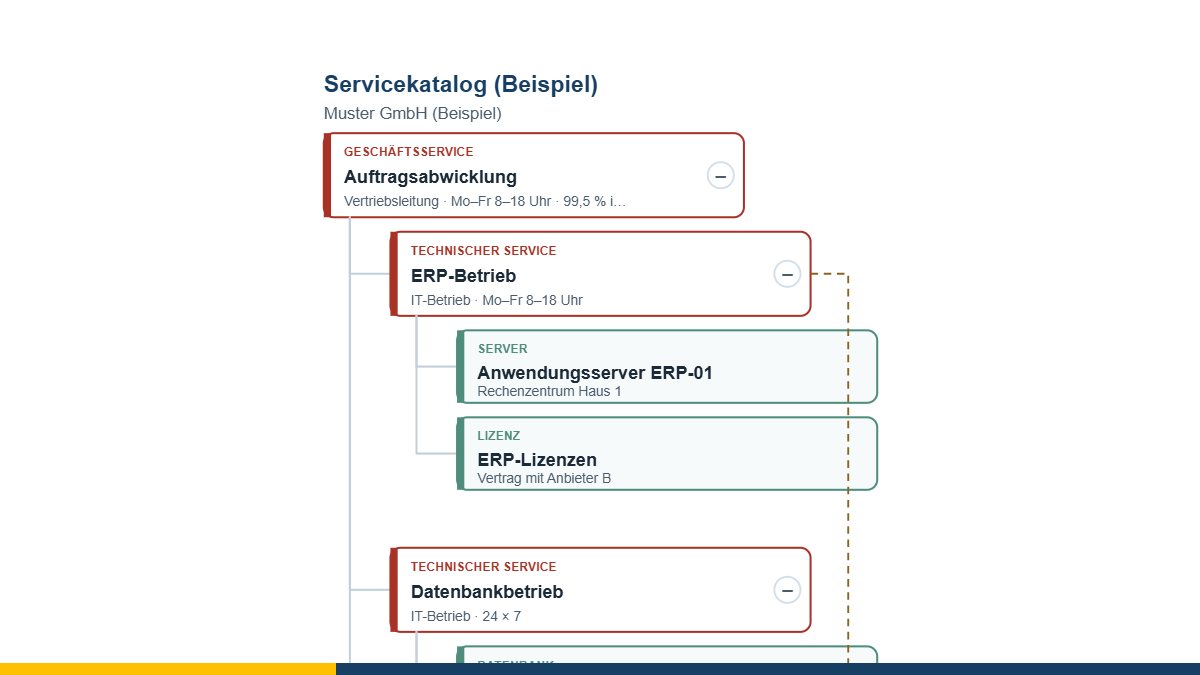
When something breaks, two questions get asked, in this order: who is affected? And who is responsible? A service catalogue answers both – provided it is built so that you can read it in thirty seconds.
That is why the service tree has exactly three levels, and will not allow more.
The three levels – and why the top one is the hardest
A business service is what the users order and notice: “order handling”, “workplace”, “payroll”. A technical service is what IT operates for it: ERP operations, database operations, sign-on and directory. A configuration item is what it runs on: a server, a database, a line, a licence.
Most people find the bottom level easy, the middle one manageable – and at the top it goes quiet. That is not a shortcoming of the tool but the actual finding: where a business service cannot be named, IT is operating something for which nobody in the business has formulated an expectation. And then there is no way to settle how bad an outage would be.
Owner, service hours, criticality
Three fields that make the difference:
- Owner. A service with no named owner is nobody’s business when it breaks. The tool points this out.
- Service hours. Without them no availability can be promised and none can be met. “99.5 %” means something entirely different round the clock than it does Monday to Friday from 8 am to 6 pm.
- Criticality in three levels: business-critical, important, supporting. Three levels are enough; five only lead to everything sliding into the middle.
The most interesting view: what carries several?
On the right the tool shows which technical services carry more than one business service – through the hierarchy or through an additional usage relationship. Usually that is sign-on, the network or a database, and it is the place where an outage becomes most expensive.
If you want to take that further, hand the same tree to two neighbouring tools:
- The outage simulation reads the file and turns the hierarchy into a dependency chain. The same relationships, a different view: there you click an element and see which business processes stop.
- The availability calculator takes a service with everything beneath it as a series circuit – and shows what three promised figures add up to.
Where the entries come from
Nobody likes typing a catalogue twice. So the content can come from:
- a file from the ITSM tool – services and configuration items maintained there,
- a model file from the 8EM modeller – IT systems become technical services,
- the CMDB of the MC4Y productivity suite, if the tool is running there and you have rights to the module.
You then arrange the hierarchy in the tool – that is the actual thinking, and it cannot be automated.
What a catalogue does not do
It is an agreement between IT and the business, not a technical inventory. It says nothing about prices, volumes or contracts. And it is only worth as much as it is kept up: a catalogue that is a year old misleads you when something breaks – worse than having none, because you believe it.
The service tree is free of charge and available as free software under the GPL: open the service tree. If you would like to organise your IT operations so that it is clear who does what when something breaks, I am happy to help – get in touch for a free initial consultation.
Open or download the tools
- Outage simulation (what fails if this one fails?)Open Download (445 KB)
- Availability and SLA (per cent, downtime, chains)Open Download (439 KB)
- ITSM tool (incidents, problems, changes)Open Download (992 KB)
- 8EM modellerOpen Download (3.3 MB)
- Service catalogue as a treeOpen Download (434 KB)
Thinking further
You can find more on this topic under IT service management consulting – or talk to me directly in a free initial consultation.
Comments
Comments are published immediately with your name. Only the name, title, comment text and time are stored – see the privacy policy.
Loading comments …