
This article was created with the AI assistant Claude and published by Peter Hoenig.
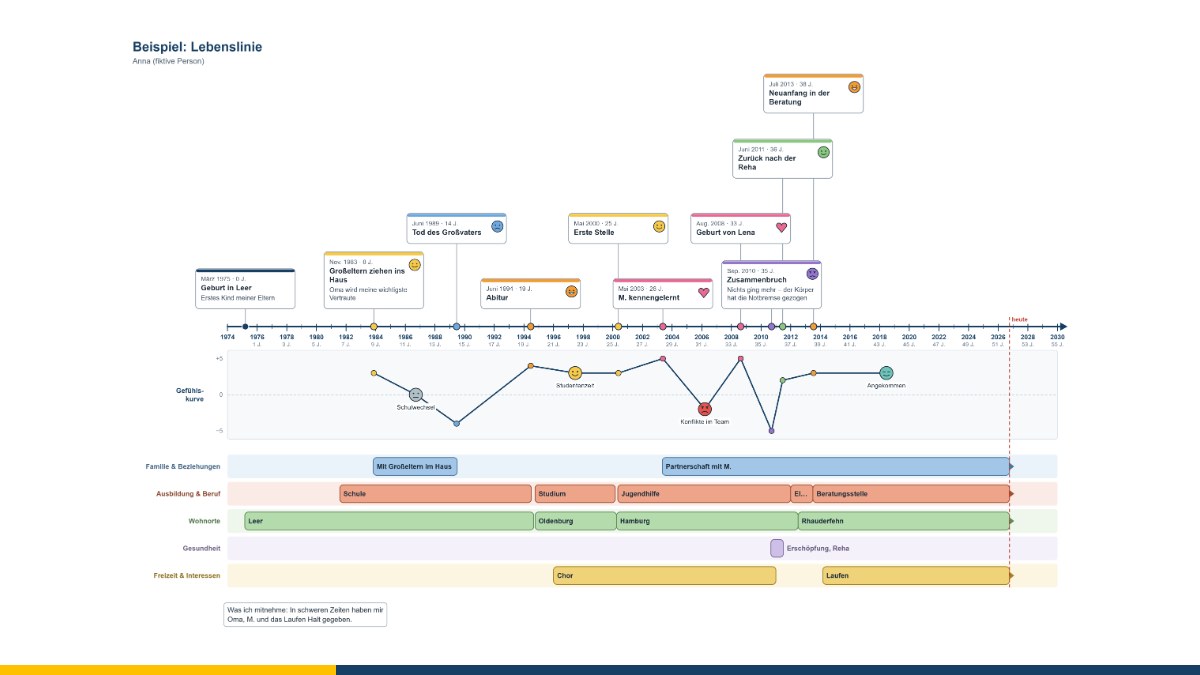
Anyone who wants to understand where they would like to go sometimes looks back first. The lifeline shows your own path as a timeline: important events, turning points, highs and lows. This look back often brings surprising insights – into your own strengths, recurring patterns and what helped in difficult times.
At a glance
- The lifeline arranges formative events on a timeline and shows how your feelings developed.
- It belongs to biographical work, which goes back to the “life review” described in gerontology in the 1960s.
- In coaching it helps with reorientation, transitions and the question of your own resources.
- The free lifeline editor presents events, periods and the emotion curve clearly and plans backwards from the goal.
- In the 3D version, the lifeline becomes a timeline you can walk along.
Aim of the method
The lifeline makes your own path through life visible as a whole. Typical questions are: Which events have shaped me? Where were the turning points? What helped me in hard times – people, abilities, places? What am I proud of? Which patterns keep repeating themselves, for example when changing jobs or in conflicts?
Looking back serves looking ahead: What would I like to write into the next years of my lifeline? In coaching, the lifeline is particularly helpful for career reorientation, before retirement, after crises or when asking what actually drives me.
Where the method comes from
Biographical work has many roots. An important one is the American psychiatrist and gerontologist Robert N. Butler, who in 1963 described the “life review”: consciously remembering and ordering one's own life as a natural and helpful process. Methods of biographical work in nursing and care, social work, education and adult education developed from this. Drawings of the lifeline with its highs and lows are widely used today in counselling, coaching and career guidance; there is no uniform format and no single originator.
How to create the lifeline
- Draw a timeline – from your year of birth or another starting point up to today.
- Enter important events: school, training, career stages, moves, relationships, successes, losses.
- Add periods, for example in the areas of life work, family, home or hobbies.
- For each event, record the feeling and its intensity – this creates a curve of highs and lows.
- Look at the line together: What stands out? What helped during the lows? Which strengths show in the highs?
- Venture a look into the future: What should come next?
- Plan backwards from the goal: Which steps lead there, how long does each one take – and when do I therefore need to start?
Working with the lifeline editor
- Timeline: Start, end and scale can be set freely. If you enter the year of birth, the axis also shows age.
- Event cards: with heading, month, description, feeling and intensity. The cards can be moved freely and arranged without overlapping at the click of a button.
- Areas of life and periods: shown as bars that you can move and lengthen or shorten – including “still ongoing”.
- Emotion curve: eleven feelings with faces, intensity from −5 to +5. Together with the feelings attached to the events, they form the curve.
- Future and backward planning: Enter a goal with a date and the steps towards it with their duration in months – the editor calculates backwards from the goal when each step has to begin and flags steps that would have had to start in the past. At the click of a button, the steps appear as dashed periods in the lifeline and the goal as a golden card; the future is set off in a different colour.
- Saving and export: Save as a file, export as PDF (also A3 for long lifelines), PowerPoint, LibreOffice Impress, Visio, SVG and PNG.
The editor runs entirely in your browser and does not transmit any data. Biographical information is very personal – please store the files with appropriate protection. The editor is free of charge and available as free software under the GPL: Open the lifeline editor in your browser.
The lifeline in 3D
In the 3D version, the lifeline becomes a timeline you can walk along: at the front lies the time axis with years and age, behind it a band with the periods for each area of life, in front of it stand signs for the events, and above it runs the emotion curve – the higher, the more positive. A figure stands at a point in time; using a slider, or moving from event to event, it walks through the years. It can look back or ahead, and if you wish, you can see the lifeline from its point of view.
It is precisely this change in viewing direction that often has a strong effect in conversation: What does my path so far look like when I look back from where I stand today? And what lies ahead of me? Events, periods and feelings can be created directly in the 3D view; the result is an image and a printable picture sheet. Files can be transferred between the 2D and 3D editors in both directions – the planning from the 2D editor is preserved. Open the 3D lifeline in your browser.
Biographical work can touch on painful memories. In coaching, the lifeline serves as a model for reflection and dialogue, not as a diagnostic instrument. Where distress is the main issue, psychotherapeutic support is the right path – coaching does not replace psychotherapy.
Conclusion
The lifeline shows what you have already mastered – and gives you strength for what lies ahead. With backward planning, looking ahead becomes a path with first steps. If you are facing a professional or personal reorientation, I will be glad to accompany you in Personal Coaching. Get in touch for a free initial consultation.
Source: Butler, R. N. (1963): The Life Review: An Interpretation of Reminiscence in the Aged. Psychiatry 26 (1), pp. 65–76.
Thinking further
You can find more on this topic under resources and downloads – or talk to me directly in a free initial consultation.
Comments
Comments are published immediately with your name. Only the name, title, comment text and time are stored – see the privacy policy.
Loading comments …